
PDF Comments and Sticky Notes Make Proofing Simple
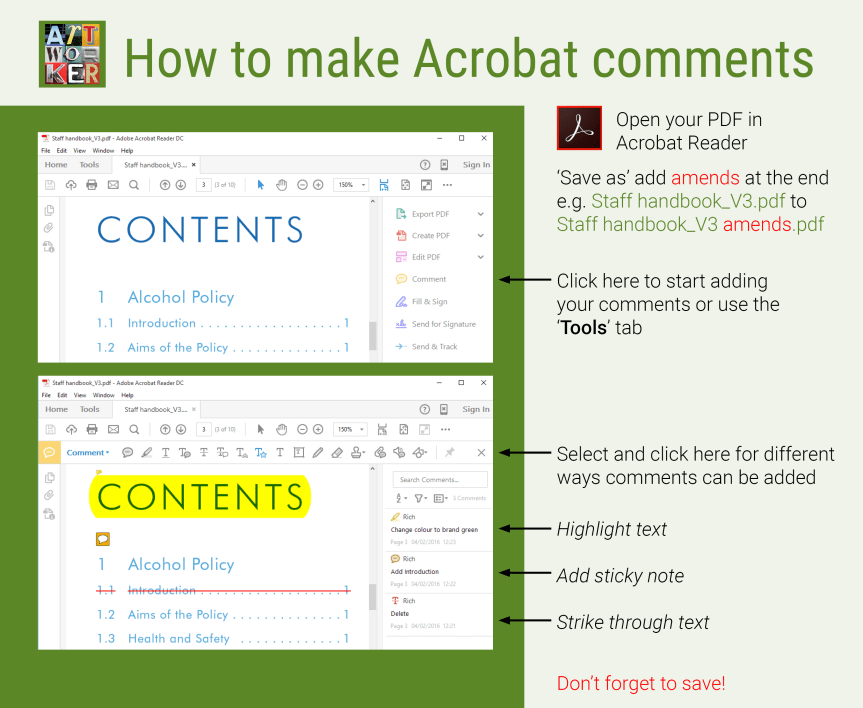
Adobe Acrobat comments and sticky notes are one of the quickest and most accurate ways to proof artwork. Instead of describing where a change is needed, reviewers can place comments directly onto the PDF using simple instructions such as delete, replace, or add. This speeds up communication and helps everyone involved in the project understand exactly what needs to be changed.
PDF comments can be shared between clients, designers, artworkers, and project managers, with each amendment displaying the reviewer’s name. Replies can be added to comments, creating a clear record of decisions throughout the proofing process. Text can also be copied and pasted directly from a PDF, helping to reduce typing errors and improve accuracy.
For Sarahjane, Adobe Acrobat comments provide an invaluable visual checklist when making amendments. Even if page numbers change during production, every comment remains attached to the correct location, making updates faster and more reliable. This efficient workflow is especially useful for large reports, brochures, catalogues, and other multi-page documents.
If you would like advice on using PDF comments or need help reviewing artwork, Sarahjane is happy to help.
Visit Sarahjane’s testimonials page to read reviews from clients and design agencies, and discover why she’s trusted to deliver accurate, high-quality artwork on time and to the highest standard.

